A handful of minor improvements and bug fixes to keep things running smoothly.
New Features:
- New Map Overlays - LiDAR and Public Access. Read more here →
- Added Total Elevation to the Personal Routes summaries.
Improvements:
- Reorganised mobile dashboard navigation, grouping Your Trail & Peak Directory pages (it was getting too big with all the features!)
- Improved password reset emails with a clear reset button and a backup link for email clients that split long URLs.
Fixes:
- Squashed a bug with our Shop Search that could allow unrelated products to jump the queue on multi-word searches (especially ones with numbers).
If you spot anything else that feels off, please holler — we’ll jump on it.
VIP members can now save Trail Directory filter presets for quick access later.
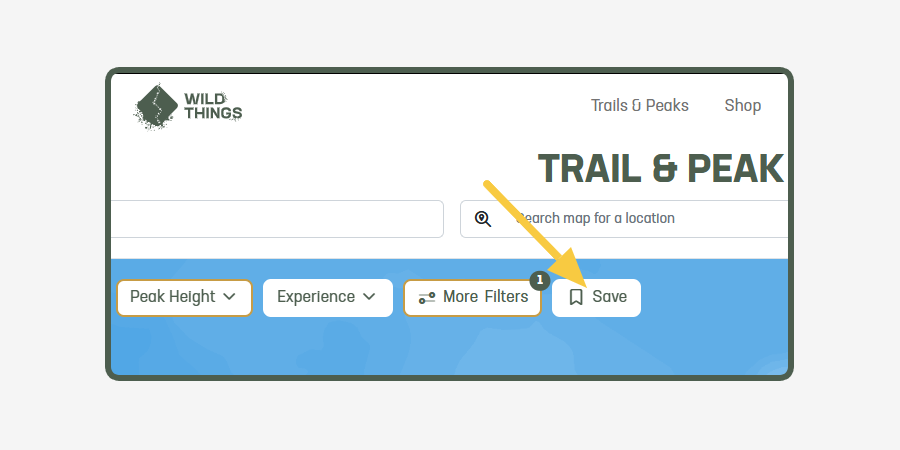
VIP members can now save Trail Directory filter presets to their dashboard.
After applying your preferred filters, select the bookmark button, give the search a name, and it will be saved to your dashboard. Saved searches remember your filter settings, making it easy to return to frequently used searches without setting everything up again.
This is especially useful for more complex searches that you'd otherwise have to recreate each time.
Try it in the Trail Directory: https://www.wildthings.club/trails/
VIP members can now search and review their private trail and peak notes from one dashboard page.
Wild Things VIP members can now see all their private trail and peak notes in one handy place.
If you've been using Wild Things as a trail journal or planning tool, this makes it much easier to look back over the notes you've saved on individual trails and peaks — without needing to remember exactly where you wrote them.
You can search your notes, filter between trails and peaks, and narrow things down by country or region.
Each note links back to the original trail or peak page, so you can quickly jump back in to review the route, update your notes, or keep planning your next adventure.
View your Trail & Peak Notes →
It's now much easier to browse between brands, categories and partner brands.
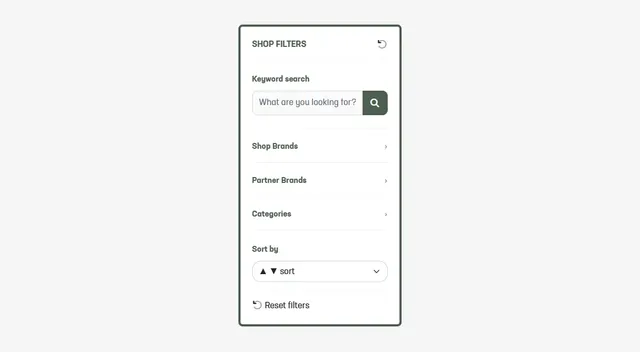
Browsing the Wild Things Shop is now much more flexible.
Instead of getting "stuck" inside a brand or category, every product listing page now includes the same navigation panel (shown at the top on mobile), making it easy to jump between brands, categories, subcategories, partner brands, or search for exactly what you're looking for.
We've also added Partner Brands to the navigation, so VIP members can quickly browse brands that offer exclusive Wild Things member discounts when purchased directly.
Whether you're comparing brands, exploring categories, or hunting for your next bit of gear, finding products is now much quicker.
Browse the Shop →
A handful of minor improvements and bug fixes to keep things running smoothly.
Fixes:
- Fixed a bug when the map on the trail or peak detail page would not always load to fit the area it should.
- Fixed two bugs with the Flyover (that wee helicopter icon): sometimes the flyover view would not expand to fit your full screen. And other times, our Live Chat button would get in the way of the close button.
- Fixed a bug where a shop search could include unavailable products
If you spot anything else that feels off, please holler — we’ll jump on it.
Browse product colours directly from shop listings.
You can now preview available product colours directly from shop listings. Simply select a colour dot to update the product photo before viewing its full details.
Shop Now →
Wild Things VIP members can now view official NSW and ACT topo maps on trail and peak pages.
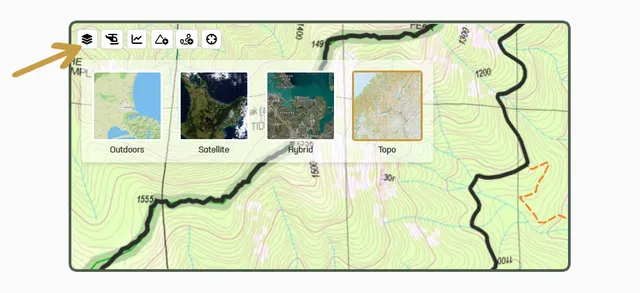
Wild Things VIP members can now switch to official NSW & ACT topo maps when viewing supported Australian trail and peak pages, plus the main Wild Things map.
We’ve offered NZ Topo maps for a long time, and they’ve become one of the standout parts of the Wild Things map experience — using real topo mapping similar to what runners and hikers actually use in the wild.
Now we’re bringing that same experience to Australia, starting with NSW and the ACT.
Topo maps are available for Wild Things VIP members when viewing supported NSW/ACT areas across both detail pages and the main map.
Next up: expanding topo coverage across more Australian states.
You can now pay for your shop orders using Online EFTPOS.
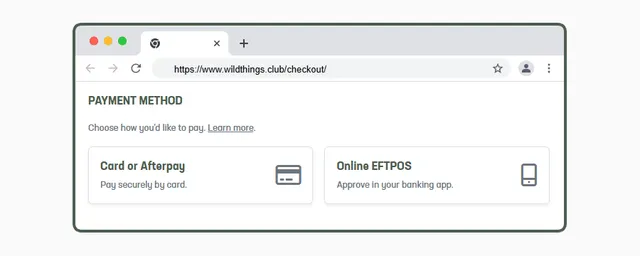
You can now pay for your Wild Things shop orders using Online EFTPOS.
Online EFTPOS lets you pay straight from your bank account by approving the payment in your banking app. No card details are entered or shared, so your payment information stays with your bank.
After entering your shipping details at checkout, you can choose to pay by card, Afterpay, Google Pay, or Online EFTPOS.
Learn more about Online EFTPOS →
Shop Now →
You can now include a Strava or Garmin activity link when submitting a new peak, so we can award points and the initial peak bag.
When submitting a new peak, you can now add your Strava or Garmin activity link. This lets us award your Explorer (and any Challenge) points, and log the first peak bag — even if you ran it before the peak was published.
We added this for trail submissions a while ago - and thought it'd be helpful for peaks too!
Wishlist, completed trail and leaderboard filters now support countries, states and counties outside New Zealand.
Wild Things VIP members can now filter their data using countries, regions, states and counties across New Zealand, Australia, the UK and Ireland.
This update improves filtering across:
- completed trails and peaks
- wishlists
- the Wild Explorers leaderboard
Previously, these filters were designed around New Zealand regions only. As the Wild Things community continues growing in Australia and the UK & Ireland, we wanted filtering to better reflect where members actually live and explore.
Available now on
To make sure you appear correctly in leaderboard filters, you can update your location settings here:
We’ve also been thinking about future leaderboard filtering based on the location of trails and peaks themselves (rather than the member’s location). That would require some fairly heavy behind-the-scenes calculations, but if that sounds useful to you, let us know — we’d love the feedback.