You can now view trail, peak, hut and campsite photos fullscreen, with swipe navigation and pinch-to-zoom.
You can now open photos fullscreen on trail, peak, hut and campsite pages, making it much easier to get a closer look.
Just tap any photo or the View gallery button to open the gallery. Swipe between photos, and pinch to zoom in on mobile (or scroll to zoom on desktop).
New trail and peak directory emails can now be filtered by region — New Zealand, Australia, the British Isles, or the Rest of the World.
Wild Things now covers trails and peaks across New Zealand, Australia, the British Isles, and the Rest of the World — and not everyone wants updates about everywhere.
So you can now choose which regions you receive new trail and peak directory emails for.
When we add new routes in a region you’ve opted into, we’ll send you an email focused on that area — for example, new trails in Australia, or new peaks in New Zealand.
Want the lot? Select All regions and you’ll hear about new directory additions wherever they land.
Prefer to keep it local? Pick just the region (or regions) you care about.
Head to Email Preferences in your account, find “There are new trails or peaks added to the Wild Things directory”, and choose the regions that suit you.
You can turn the emails off entirely there too, same as before.
A quicker way to submit a trail from an activity you’ve done.
Submitting a new trail is now a fair bit easier (and quicker) if you’ve got Strava or Garmin connected to your Wild Things account.
Instead of faffing around exporting and uploading a GPX file, simply paste a link to an activity you recorded on the route. We’ll pull in the route and use it for your trail submission.
Don’t have your accounts connected yet? Head to your Integrations page.
Submit a trail
Make trails easier to tell apart when they overlap or run close together on the map.

When several trails cross, overlap or run side by side, it can sometimes be hard to tell which line is which.
We've added a new Distinguish trails button to the Trail Directory map to make things clearer. Tap the paint palette icon and the trails on screen will temporarily switch to bright, contrasting colours, making it much easier to see where each one goes.
Yes, it turns that bit of the map into a bit of a rainbow — but that's kind of the point. 🌈
Tap it again to return to the normal map. It'll also reset when you move elsewhere or make other changes to the map — just hit the paint palette again whenever you need it.
It's available to everyone on the main Trail Directory map.
👉 Turn the Wild Things Trail Directory into a rainbow 🌈
New size and product filters make it easier to find what you're actually looking for.
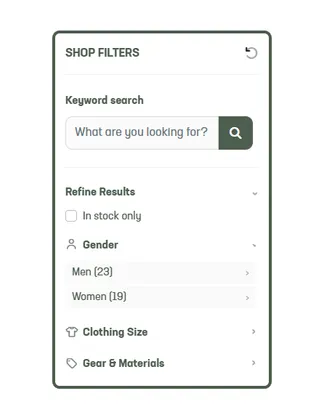
We've added some new ways to refine your shop results and get to the stuff you're actually looking for.
You'll find them under Refine Results when browsing the shop, with useful filters for Gender, Gear & Materials, and Food & Fuel — and only the relevant options appearing as you browse.
And then there's size.
We'd seen plenty of size filters that simply throw every variation into one big list — S, Small, Men's S, or 32, 32", 32 inches, and everything else mixed together.
We wanted ours to be more useful than that.
So we've spent a fair bit of time making sense of all the different sizing systems and variations, bringing different versions of the same size together and separating different types of sizing where it makes sense.
There can still be some variation between brands — something like a pair of shorts might use S/M/L sizing from one brand and waist sizing from another. So when more than one size type is shown, it's worth checking each relevant one.
These new filters are there as an extra helping hand. You can still browse by category and sub-category, brand, or keyword search as before, then use Refine Results to narrow things down further.
All of which makes it a little easier to narrow down hundreds of products and find what you're looking for.
Have a browse →
Product listings now show availability for individual options, sizes and variations.
A product is in stock. Great! Except the size you want isn't. Or the colour. Or the 50-serve bag. Sigh.
Before now, if any option for a product was in stock, we'd show the product as available — and you'd have to open it up and start choosing options to find out whether the one you actually wanted was there.
The obvious fix would be to split every size, colour and variation into separate products. But then you'd have a shop full of near-identical listings, and buying two different options would become a pain. No thanks.
So, after wrestling with single options, multiple options, colours, sizes, lengths and various combinations thereof, we've landed somewhere much nicer.
Product listings now show availability for individual options and combinations, so you can see what's in stock (and what's not) before clicking through. For products with heaps of combinations, we'll show a few upfront rather than turning each product card into a small novel.
It's a little change on the surface. It was considerably less little behind the scenes.
Hopefully it saves you a few clicks — and the disappointment of discovering that yes, technically we have Tailwind in stock... just not the bloody bag you wanted.
Keep up with the stuff that’s relevant to you on Wild Things, with fewer emails.
We know email fatigue is real — and we're well aware that Wild Things can send a fair few of them!
So we've added in-app notifications as a quieter way to keep you in the loop when something relevant to you happens on Wild Things — without everything needing to land in your inbox.
You'll now see notifications for things happening around the Trail and Peak Directory — community messages, wishlist activity, FKTs, Legends and more — as well as badges, challenge updates, orders, Personal Route PBs and goals, account updates, and other useful bits and pieces.
You may also occasionally get a gentle nudge about Wild Things features you might not have discovered yet.
And because more of this can now happen inside Wild Things, you can turn down the email noise too. Head to Email Preferences in your account to choose which emails you'd still like to receive.
You'll find your notifications under the bell icon 🔔 whenever you're logged in.
Less inbox clutter. The useful stuff, when you want it.
Set completion goals, see how your times are trending, and easily keep track of your route history.
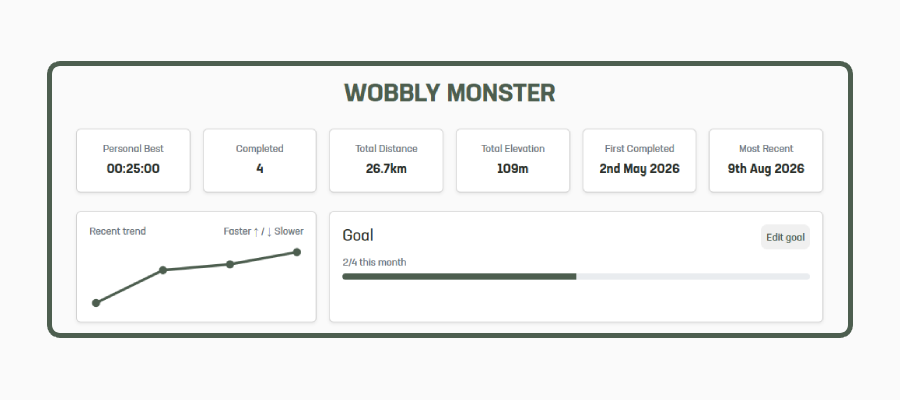
We've added a few new ways to track how you're getting on with your Personal Routes.
You can now set yourself a goal for how many times you'd like to complete a route each week or month, and see your progress towards it as you go.
We've also added a recent trend showing how your times have changed over your latest completions, making it easy to see at a glance how things are going.
And for those routes you do again and again, we've tidied up your activity history so it's much easier to browse without taking over the page.
Check our your personal routes: https://www.wildthings.club/dashboard/personal-routes/
Members can now choose a default basemap that opens automatically on directory maps.
You can now choose a default map style for your account.
On the main Trail Directory map, open the map style menu, select your preferred style, then tap the ⭐ on its thumbnail. From then on, the map will open using that style automatically.
Your default is also used on trail, peak and hut detail maps where it's available. You can still switch to any other map style at any time using the map style menu.
If you ever want to remove your default, just tap the ⭐ again.
A handful of minor improvements and bug fixes to keep things running smoothly.
New Features:
- New Map Overlays - LiDAR and Public Access. Read more here →
- Added Total Elevation to the Personal Routes summaries.
Improvements:
- Reorganised mobile dashboard navigation, grouping Your Trail & Peak Directory pages (it was getting too big with all the features!)
- Improved password reset emails with a clear reset button and a backup link for email clients that split long URLs.
Fixes:
- Squashed a bug with our Shop Search that could allow unrelated products to jump the queue on multi-word searches (especially ones with numbers).
If you spot anything else that feels off, please holler — we’ll jump on it.